TL;DR
A CRM keeps every lead, bid, and job in one place instead of scattered across spreadsheets, texts, and a salesperson's memory. The eight we'd point a contractor or construction business to, and who each one is for:
- JobNimbus: best for roofing and exterior crews who live in the field and on mobile.
- Buildertrend: best for home builders and remodelers who need CRM, scheduling, and financials in one system.
- Contractor Foreman: best all-in-one for small-to-mid contractors watching the budget.
- Followup CRM: best for sales teams who win or lose on bid follow-up and close rate.
- MarketSharp: best for home-improvement remodelers running lead-gen and appointment-setting at volume.
- Builder Prime: best for exterior remodelers (roofing, siding, windows) who want sales and production in one place.
- Jobber: best for smaller field-service shops that quote, schedule, and invoice on the go.
- Procore: best for larger commercial builders who need enterprise-grade construction management.
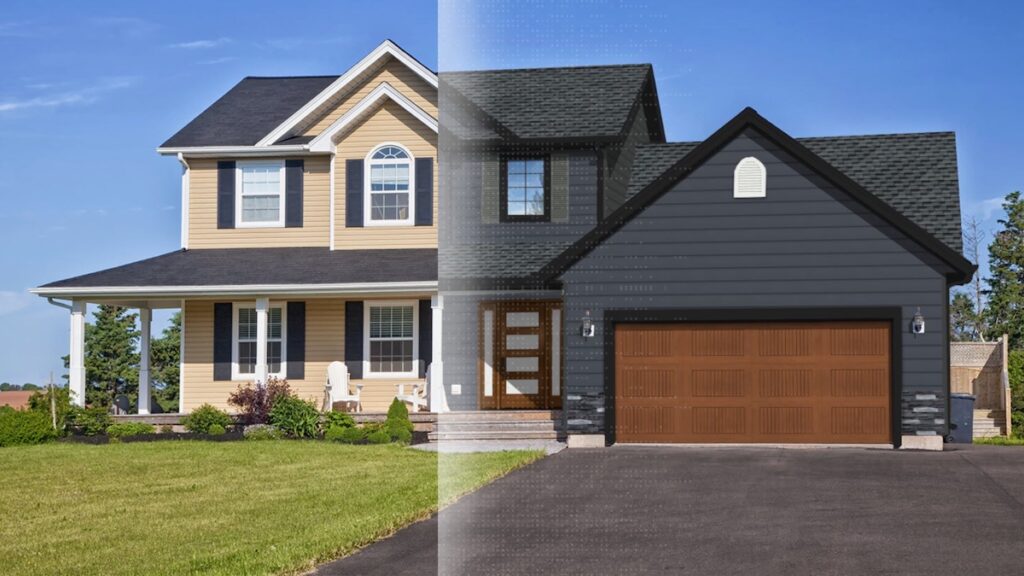
Whichever you choose, the CRM organizes the pipeline, but the moment that actually closes an exterior job is when the homeowner sees the result. That's the layer Renoworks Pro adds on top.
Introduction
In construction and remodeling, the job rarely falls apart on the jobsite. It falls apart in the gap between the first call and the signed contract: the lead that never got a follow-up, the bid that sat in someone's inbox, the quote that went out three days too late. A customer relationship management (CRM) platform closes that gap. It keeps every lead, estimate, conversation, and job in one place, so nothing slips because it lived in a salesperson's head or a spreadsheet nobody updated.
For contractors, "CRM" has come to mean more than a digital Rolodex. The tools below blend lead and pipeline management with the things construction businesses actually run on: estimating, scheduling, job tracking, document storage, client communication, and invoicing. Some are purpose-built for the trades. A few are general-purpose platforms that contractors have bent to fit. The trick is matching the tool to how you actually sell and build, not to a feature list.
This guide compares the eight CRMs we'd put in front of a contractor or construction business: what each one is best at, where each one falls short, and which one fits your situation. Pick the wrong one and you'll fight it for a year. Pick the right one and it pays for itself in jobs you'd otherwise have let slip.

What to Look for in a Contractor CRM
A CRM for a software startup and a CRM for a roofing company are not the same tool. As you compare the eight below, here's what actually matters for the trades:
- Built for construction, or bent to fit? General CRMs (HubSpot, Salesforce) are powerful but generic, so you'll spend weeks configuring them to understand a "job" or a "bid." Construction-specific tools speak the language out of the box.
- CRM vs. project management overlap. Some tools on this list are sales CRMs first (Followup CRM, MarketSharp); others are full construction-management platforms with CRM baked in (Buildertrend, Procore). Decide whether you need the front end (sales) or the whole pipeline (sales to production to invoicing).
- Mobile and field-ready. Your crews aren't at a desk. If reps can't quote, photograph, and update a job from a phone in a driveway, adoption dies in week two.
- Estimating and bid tracking. The CRM should know the difference between a lead, a bid, and a won job, and tell you your close rate without a spreadsheet export.
- Integrations. QuickBooks for accounting, measurement tools (EagleView, Hover), email and calendar, and your visualization tool. A CRM that doesn't talk to the rest of your stack just creates a new silo.
- Pricing that fits your size. Flat-rate, per-user, or quote-based enterprise: the right tool is the one whose pricing scales with your crew, not against it.
- Adoption, honestly. The most powerful CRM is worthless if your team won't use it. Simpler tools with high adoption beat feature-rich tools that sit empty.
How We Evaluated These Tools
We weighted each pick on fit for contractors and construction businesses specifically, not on how it scores as a generic sales CRM. That means: how well it handles the trades workflow (lead to estimate to job to invoice), how field-ready the mobile experience is, the depth of construction-relevant integrations, the honesty of its pricing, and the real-world adoption stories we hear from contractors and our own partners.
Each pick below has a Best for badge to point you to the business it serves best, a few strengths grounded in what the tool actually does well, and an honest limitation. We're not ranking by popularity or marketing budget; we're ranking by fit. The order runs roughly from the trades-specific tools most contractors should start with, down to the enterprise platform built for a different scale entirely.
Stop competing on price.
Win on trust.
Twenty top contractors on what they say at the kitchen table to win the job without dropping their price.
Check out the playbook →
CRM Comparison at a Glance
Here's how the eight stack up side by side. Skim the table for the shortlist, then read on for the detail on each pick.
Pricing models change often, so confirm current plans on each vendor's site before deciding.
The 8 Best CRMs for Contractors and Construction Businesses
Here's the detail on each pick, in the same order as the table above.
1. JobNimbus
Best for: Roofing, siding, and exterior contractors who run their business from the field and from a phone.
JobNimbus is a CRM and project-management hybrid built for exterior contractors, roofing especially, where it's become close to a default. It tracks a job from the first knock through to the paid invoice: lead capture, estimates, task boards, scheduling, and a genuinely good mobile app crews actually use. It integrates with the tools roofers already run, including QuickBooks and aerial-measurement providers, so the estimate, the job, and the books stay in sync.
Strengths
- Field-first mobile. Reps update jobs, snap photos, and send estimates from the driveway. Adoption tends to stick because the app fits how crews work.
- Visual pipeline boards. Drag a job from "lead" to "approved" to "invoiced" and the whole team sees where every deal stands.
- Roofing-ecosystem integrations. Aerial measurements, supplier ordering, and QuickBooks all connect, which removes most of the double entry.
Where it falls short
- Pricing is quote-based, so you won't find a number on the site; you'll talk to sales to scope it to your team.
- It's optimized for exterior trades. A commercial GC or a custom-home builder may find it lighter on the construction-management side than a Buildertrend or Procore.
Try it: jobnimbus.com
2. Buildertrend
Best for: Home builders and remodelers who want CRM, project scheduling, and financials in a single platform.
Buildertrend is one of the most established construction-management platforms, and the CRM is the front door to a much larger system: scheduling, budgets, change orders, daily logs, client communication, and a homeowner portal. For a builder or remodeler who wants one tool from "interested lead" all the way through "final walkthrough," it's a strong fit: the sales pipeline feeds directly into the production and financial sides.
Strengths
- End-to-end coverage. Sales, project management, and accounting in one platform means selections and budgets don't get re-keyed between systems.
- Client portal. Homeowners see schedules, approve selections, and message you in one place, which cuts the "what's the status?" calls.
- Mature ecosystem. Deep integrations (including QuickBooks and Xero) and a large user base mean plenty of training resources.
Where it falls short
- It's a lot of platform. If you only need a sales CRM, Buildertrend is more than that, with the price and learning curve to match.
- Pricing steps up quickly across tiers as you add features, so it can outgrow a small shop's budget.
Try it: buildertrend.com
3. Contractor Foreman
Best for: Small-to-mid contractors who want all-in-one construction management without enterprise pricing.
Contractor Foreman built its reputation on being the affordable all-in-one. It bundles a CRM with estimating, scheduling, project management, time tracking, and invoicing at a flat company rate rather than a steep per-user climb, which makes it one of the most accessible ways for a smaller contractor to get off spreadsheets without committing to a five-figure platform.
Strengths
- Budget-friendly, flat-rate pricing. A predictable monthly cost for the whole company, not a per-seat meter that punishes you for growing.
- Broad feature set for the money. CRM, estimates, scheduling, and project tools that would cost far more bundled elsewhere.
- QuickBooks and estimating integrations keep the books and bids connected.
Where it falls short
- Breadth over polish. Covering this much ground at this price means individual modules can feel less refined than a single-purpose tool.
- Onboarding takes effort. A lot of features means a real setup investment before it's humming.
Try it: contractorforeman.com
4. Followup CRM
Best for: Construction sales teams whose wins and losses come down to bid follow-up and close rate.
Followup CRM is a sales-first CRM built specifically for contractors, and it stays in its lane on purpose. Instead of trying to run your whole business, it obsesses over the sales pipeline: tracking bids, automating follow-ups, and reporting on win rates and salesperson performance. For a company that bids a lot and loses deals to slow or missed follow-up, that focus is the entire value.
Strengths
- Bid and follow-up tracking that actually tells you which estimates are going stale and who's dropping the ball.
- Sales reporting and accountability. Win rates, pipeline value, and rep performance without a spreadsheet export.
- Lightweight and quick to adopt because it doesn't ask your team to run production inside it.
Where it falls short
- It's sales only. No project management, scheduling, or financials, so you'll pair it with other tools for the build side.
- Best for teams with real sales volume. A solo operator may not need this much pipeline machinery.
Try it: followupcrm.com
5. MarketSharp
Best for: Home-improvement remodelers running lead generation and appointment-setting at volume.
MarketSharp is one of the longest-running CRMs built for the home-improvement and remodeling industry, and it's tuned for the lead-heavy, appointment-driven sales motion that defines that world. It manages leads from every source, automates the marketing and follow-up, schedules appointments, and reports on cost-per-lead and conversion, the metrics a high-volume remodeler lives and dies by.
Strengths
- Lead management at volume. Built for businesses generating leads across many channels and needing to route, nurture, and measure them.
- Marketing automation. Follow-up campaigns, appointment reminders, and reactivation built around the remodeling sales cycle.
- Industry-specific reporting. Cost-per-lead, set/closed rates, and source ROI out of the box.
Where it falls short
- The interface shows its age next to newer tools; function over polish.
- Aimed at the marketing/sales engine, not jobsite project management, so larger builds need a companion tool.
Try it: marketsharp.com
6. Builder Prime
Best for: Exterior remodelers (roofing, siding, windows) who want sales and production in one place.
Builder Prime targets the home-improvement and exterior-remodeling contractor, and its strength is connecting the sales side to production. Lead management, estimating, customer-facing proposals, and production scheduling live in one system, with a customer portal and the kind of reporting that shows you where deals and jobs are getting stuck. It sits comfortably between a pure sales CRM and a full construction-management suite.
Strengths
- Sales-to-production handoff. A won deal flows into scheduling and production without re-entry.
- Customer experience tools. Digital proposals and a client portal that make a small shop look polished.
- Built for exterior trades, so the workflow assumes roofing/siding/window-style jobs rather than generic projects.
Where it falls short
- Per-user pricing can add up for a larger sales team.
- Narrower fit. Purpose-built for home improvement; it's not aimed at commercial GCs or custom-home builders.
Try it: builderprime.com
7. Jobber
Best for: Smaller home-service and field-service contractors who quote, schedule, and invoice on the move.
Jobber is field-service management with a clean, approachable CRM at the front. It's a favorite of smaller contractors and service businesses because it nails the everyday loop (request, quote, schedule, do the work, invoice, get paid) without a steep learning curve. The client hub lets customers approve quotes and pay online, and the mobile app keeps a small crew coordinated.
Strengths
- Genuinely easy to adopt. Among the fastest tools here to get a small team actually using.
- Quote-to-invoice loop that's smooth end to end, with online approvals and payments built in.
- Strong mobile and scheduling for crews running multiple jobs a day.
Where it falls short
- Lighter on heavy construction. Great for service and smaller jobs; thinner for complex, long-running builds with change orders and detailed budgets.
- Per-user tiers mean costs climb as you add seats and unlock advanced features.
Try it: getjobber.com
8. Procore
Best for: Larger commercial builders and general contractors who need enterprise-grade construction management.
Procore is the heavyweight on this list, an enterprise construction-management platform covering project management, financials, quality and safety, and field productivity, with CRM and bid-management capabilities for the preconstruction side. It's built for the scale and complexity of commercial construction, where dozens of stakeholders and millions of dollars run through a single project.
Strengths
- Enterprise depth. Handles complex, multi-stakeholder commercial projects that would overwhelm the lighter tools here.
- Bid and preconstruction management that connects winning the work to running it.
- Vast integration marketplace and the reporting a large operation needs for control and compliance.
Where it falls short
- Enterprise pricing and complexity. Annual, quote-based, and a significant implementation; overkill for a residential remodeler or small contractor.
- CRM is one piece of a much larger system, not the headline. If you want a focused sales tool, this isn't it.
Try it: procore.com
Your CRM tracks the lead. Renoworks closes it.
Homeowners say yes faster when they see it on their own house. Renoworks contractors average $20K a job vs. $8,800.
 The visualization layer behind the +300 brands you trust





So Which CRM Should You Choose?
The right pick depends on what kind of contractor you are and where deals get stuck:
- If you're a roofing or exterior contractor working from the field, start with JobNimbus; it's built for exactly your workflow and your crews will actually use it.
- If you're a builder or remodeler who wants one system end to end, Buildertrend carries you from lead to final walkthrough.
- If budget is the constraint and you want all-in-one, Contractor Foreman gives you the most ground covered for the money.
- If you're losing deals to slow follow-up, Followup CRM is laser-focused on bid tracking and close rate.
- If you generate leads at volume and live on set/close rates, MarketSharp is built for that engine.
- If you're an exterior remodeler who wants sales and production connected, Builder Prime bridges both.
- If you're a smaller field-service shop, Jobber is the easiest to adopt and run day to day.
- If you're a commercial GC operating at scale, Procore is the enterprise platform built for that complexity.
Whatever you land on, remember what the CRM does and doesn't do: it organizes the pipeline, but it doesn't close the homeowner. For exterior work, that's a visualization conversation, and it's worth pairing your CRM with a tool that lets the customer see the finished result before they commit.
Frequently Asked Questions
What's the difference between a CRM and construction project-management software? A CRM manages the sales side: leads, bids, follow-ups, and the pipeline up to the won job. Construction project-management software runs the build: scheduling, budgets, change orders, and field coordination. Several tools here (Buildertrend, Procore, Contractor Foreman) do both; others (Followup CRM, MarketSharp) focus on the sales front end. Decide which problem is costing you more before you choose.
Do I need a construction-specific CRM, or will a general one like HubSpot work? A general CRM can work, but you'll spend real time configuring it to understand bids, jobs, and trades workflows, and the field/mobile experience often isn't built for crews. For most contractors, a purpose-built tool gets you running faster and sees higher adoption. If your sales motion is unusually simple, a general CRM's free tier can be a fine starting point.
How much does a contractor CRM cost? It ranges widely. Flat-rate all-in-one tools can start in the low hundreds per month for a whole company; per-user tools scale with your team; and enterprise platforms are annual, quote-based commitments. Match the pricing model to your size: a per-seat tool gets expensive fast as you grow a sales team, while a flat rate rewards it.
Will a CRM integrate with the rest of my tools? Most of the tools here connect to QuickBooks for accounting, and the trades-specific ones often integrate with measurement tools (EagleView, Hover) and visualization platforms. Check that your must-have integrations exist before committing; a CRM that won't talk to your books or your estimating tool just creates another silo.
Related Reading
- The Stack That Separates a $5M Contractor from Someone Chasing Bids
- 4 Things the Best Exterior Contractor Websites Do Differently
- Top 5 Interior House Design Apps That Actually Work
Conclusion
The best CRM for your construction business isn't the one with the longest feature list; it's the one your team will actually use and that fits how you sell and build. Roofing and exterior crews should look hard at JobNimbus; builders and remodelers at Buildertrend; budget-minded shops at Contractor Foreman; sales-driven teams at Followup CRM or MarketSharp; exterior remodelers at Builder Prime; small field-service businesses at Jobber; and commercial operations at Procore.
But the CRM is only half the equation. It organizes your pipeline; it doesn't close the deal for you. On exterior remodels, what closes the deal is letting the homeowner see the finished result on their own home before they sign. Pair the right CRM with Renoworks Pro and you've got both halves: a pipeline that never drops a lead, and a sales conversation the homeowner can actually see.
Picked your CRM? Now win the job.
Homeowners see the finished result on their own home, say yes faster, and trade up to better products.
Trusted by Alside, CertainTeed, James Hardie & more