TL;DR
A paint visualizer previews a new color on a photo of your actual house before you open a can. The five we trust most:
- Renoworks: best overall and the only one that shows paint alongside a new roof, siding, and trim. Start free.
- Hover: best for cross-shopping real paint brands (PPG, Benjamin Moore, Behr) on your own photo, free.
- Exterior Paint Visualizer (app): best on an iPhone, with AI auto-masking and the biggest color library.
- Housepaint AI: best free, browser-based AI that separates siding from trim on its own.
- Sherwin-Williams ColorSnap: best single-brand tool, free across web, mobile, and AR.
Short on time? Start with the free Renoworks Paint Visualizer. It shows your new color in context with the roof, siding, and trim it has to live next to.
Introduction
Exterior paint is the cheapest way to transform a house and the easiest to get wrong. A full exterior repaint runs $3,000 to $10,000, covers every surface a passerby sees, and stays on the house for the better part of a decade. Yet most people still choose the color off a two-inch fan-deck chip held against the siding in the wrong light, then hope. Get it right and the whole street notices. Get it wrong and so do you, every time you pull into the driveway, for the next decade.
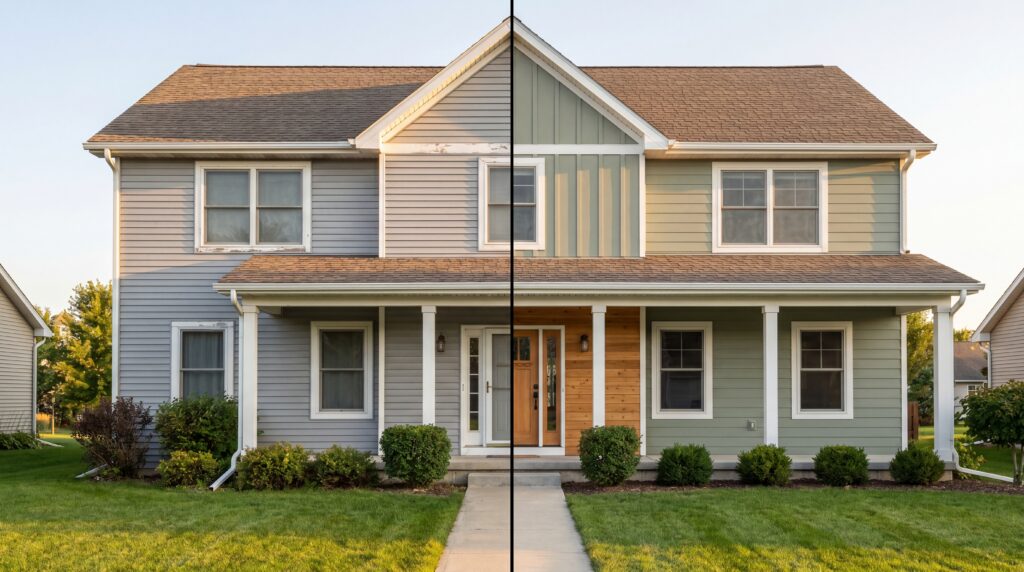
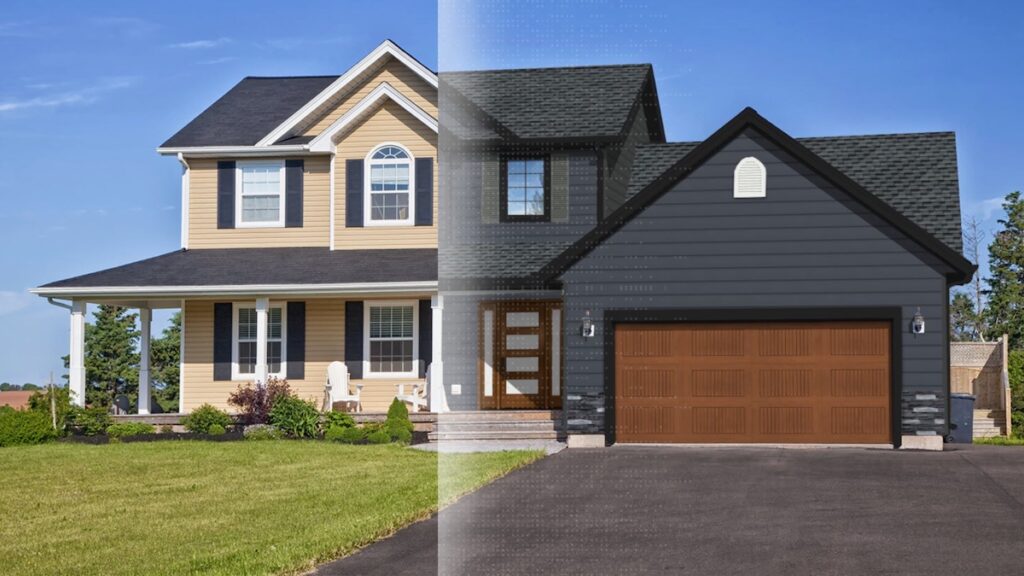
A paint visualizer fixes that: upload a photo of your home and see a deep charcoal body, a warm greige, or a crisp black-and-white farmhouse scheme on your actual house before a single can is opened. Below are the five we trust most, what each is best at, and where each falls short.
The 5 Paint Visualizers at a Glance
| Tool | Best for | Pricing | Standout |
|---|---|---|---|
| 1Renoworks | Whole-exterior color decisions; contractors | Free tool · paid platform | Paint + siding + roofing + trim in one view; 350+ brands |
| 2Hover | Cross-shopping real paint brands, free | Free to start | PPG, Benjamin Moore, and Behr in one tool |
| 3Exterior Paint Visualizer (app) | iPhone users who want AI speed | Freemium | AI auto-masking · tens of thousands of colors |
| 4Housepaint AI | Free browser-based AI | Free | Detects siding vs. trim automatically |
| 5Sherwin-Williams ColorSnap | Sherwin-Williams shoppers | Free | Web, mobile, and live AR |
What Is a Paint Visualizer?
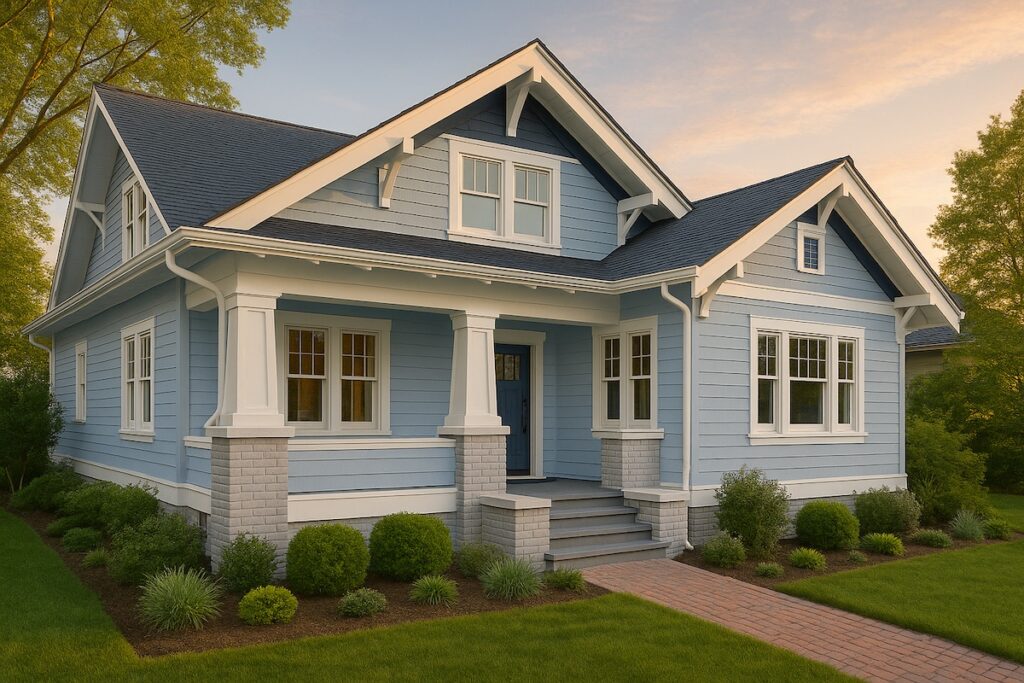
A paint visualizer lets you preview new colors on a real photo of your home before you buy. You'll also see it called an exterior paint visualizer, a house color simulator, or an AI paint app; same idea. The good ones recolor the body, trim, front door, and accents, hold the real texture and shadows of the surface, and render results sharp enough to win over a spouse, a painter, or a skeptical HOA board.
The category splits four ways:
- Whole-exterior platforms (Renoworks): recolor paint and swap real siding, roofing, stone, and trim in the same view, from real product catalogs.
- Multi-brand color tools (Hover, the AI apps): pull dozens of paint brands into one place so you can cross-shop colors on your own photo.
- Manufacturer-branded tools (Sherwin-Williams, Behr, Benjamin Moore): free and color-accurate for one brand's fan deck, with no cross-brand comparison.
- Interior room visualizers (PPG, Glidden, Farrow & Ball): excellent for a living room, but they don't do the outside of a house. A different job.
Why Use One Before You Paint?
It's a decision-making tool, and it pays off differently depending on who's holding it.
- Homeowners kill decision regret. A greige that reads warm on a sunny ranch can turn cold and flat on a north-facing colonial, and exterior color depends on the roof, the stone, and the fixed elements around it. Ten minutes now beats a decade of wishing you'd gone two shades darker.
- Contractors and painters close faster. Homeowners stall when they can't picture the result; a photorealistic preview of their own house removes the biggest source of "let me think about it," and turns the upsell to premium trim or a second accent color into an easy yes.
- Manufacturers generate leads. When a brand lets a homeowner visualize its colors on their own home, engagement jumps and the session becomes a qualified lead instead of an anonymous bounce.
In short, a visualizer compresses the gap between "I think I like that color" and "buy the paint."
See it before you paint it.
Upload one photo. Your home in a new color, in context with the roof and trim.
 The visualizer behind the 350+ brands you trust





What to Look for in a Paint Visualizer
Seven things separate a real tool from a toy:
- Your own photo: can you paint your actual house, or only a stock sample home?
- Surface detection: does AI find the siding, trim, and door, or do you mask each one by hand?
- Texture-true rendering: does the color sit on real siding texture and shadow, or flatten the wall into a sticker?
- Whole-exterior scope: can you coordinate paint with the roof, stone, and trim, the way the decision actually gets made?
- Real, orderable colors: real fan-deck colors with codes you can buy, not approximate swatches.
- Cross-brand comparison: can you put a Sherwin-Williams next to a Benjamin Moore next to a Behr?
- Before/after and sharing: side-by-side is what closes the decision, and you should be able to send it without screenshots.
How We Evaluated These Tools
We ran each tool against the same home photo (a two-story with mixed siding and brick, a dated tan body, white trim) through the same scenarios: repaint the body, change the trim, add a bold front-door accent, and show the result to someone with no design background (the real test) to gauge realism. We also drew on our own data from building exterior visualizers for the building-products industry. Each pick gets a Best for, three strengths, and an honest limitation. We rank by fit, not popularity.
The Top 5 Paint Visualizers in 2026
Ordered by overall fit. The tool at the top fits the widest range of users; each one below is better for a more specific situation.
1. Renoworks
Renoworks is the only tool on this list where paint is part of the whole exterior, not the whole job. Upload one photo and its AI preps the house in under a minute. From there, recolor the body, trim, and doors, and in the same view swap real siding, roofing, stone, and shutters from 350+ manufacturer catalogs. That's the difference between picking a paint color in isolation and seeing how it actually reads against the roof and the front door you already have.
Strengths
- Paint plus the whole exterior in one view: coordinate body color with real roofing, siding, stone, and trim, not just a flat wall.
- Real, orderable products: 350+ brand catalogs with accurate colors and SKUs, so what you preview is what gets bought.
- Built for the sale: contractors run it as their own branded visualizer to capture leads, with a free homeowner tool to start.
Watch-outs
- The full platform is paid and contractor-grade (the homeowner visualizer is free).
- More tool than a homeowner needs for a thirty-second single-color check.
Try it: Renoworks Paint Visualizer · Renoworks Pro
2. Hover
Hover built its business on contractor-grade 3D measurement, and its free paint color visualizer borrows that credibility. The short version: the company pros trust to measure a roof down to the inch will also let you audition a body color for free. Upload a photo of your home, inside or out, pick a surface, and try colors from real brands, including PPG, Benjamin Moore, Behr, and Dunn-Edwards, in one place.
Strengths
- Multi-brand in one tool: compare a Behr against a Benjamin Moore without bouncing between four brand sites.
- Free, and uses your own photo, with exterior surfaces covered (siding, trim, garage, and front doors).
- Backed by a serious pro platform, so the color libraries are real and current.
Watch-outs
- Manual surface selection, no AI auto-masking, so a busy facade takes patience.
- The free paint tool is the top of Hover's funnel; the real depth lives in its paid contractor product.
3. Exterior Paint Visualizer (App)
This is the app most people land on when they search "exterior paint visualizer" in the App Store, and it earns the spot. Snap a photo of your home and its AI detects and masks the walls, trim, shutters, garage, and doors automatically, then lets you try tens of thousands of colors across most major brands (Sherwin-Williams, Benjamin Moore, Behr, PPG, Valspar, Dulux, and more) with a clean before/after.
Strengths
- True AI auto-masking: it finds the surfaces so you don't trace them.
- The widest color library here, across nearly every major brand.
- Multiple surfaces in one image, with a side-by-side before/after.
Watch-outs
- iOS only: no Android or web version.
- Freemium: the first visualization is free, then it runs on paid credit packs.
4. Housepaint AI
Housepaint AI is the clearest example of the new generative-AI wave aimed straight at the homeowner. Upload an exterior photo and it automatically detects the siding and repaints it while preserving the trim and the texture of materials like brick, with thousands of colors across Sherwin-Williams, Benjamin Moore, Behr, PPG, Farrow & Ball, and more.
Strengths
- Free and browser-based, no app to install.
- Strong AI auto-detection that respects trim and material texture.
- Broad brand coverage for cross-shopping colors.
Watch-outs
- A smaller, newer name than Hover or the paint majors, so less of a track record.
- Tuned for speed: confirm a final color against a physical sample before you buy.
5. Sherwin-Williams ColorSnap Visualizer
ColorSnap is the most complete of the single-brand tools. Paint a photo of your own home (interior or exterior) on the web, or use the mobile app's Instant Paint AR mode to try colors in real time, all from Sherwin-Williams' full, color-accurate catalog, free.
Strengths
- Genuinely cross-platform: web, iOS, Android, plus live AR.
- Your own photo, exterior supported, from a brand painters already trust.
- Free, with exact Sherwin-Williams color codes to hand your painter.
Watch-outs
- Single brand: no cross-shopping against Behr or Benjamin Moore.
- Exterior painting is manual (paint, brush, erase); no auto-masking on the web tool.
So Which Paint Visualizer Should You Choose?
- Coordinating paint with a new roof, siding, or stone? Renoworks is the only one that shows the whole exterior on one photo, with real, orderable products.
- Want to cross-shop real brands for free? Hover puts PPG, Benjamin Moore, and Behr in one tool.
- On an iPhone and want AI speed? The Exterior Paint Visualizer app auto-masks and carries the biggest color library.
- Want a free AI in your browser? Housepaint AI detects siding and trim on its own.
- Locked on Sherwin-Williams? ColorSnap is free across web, mobile, and AR.
A few honorable mentions worth knowing: Behr Paint Your Place, Benjamin Moore's Personal Color Viewer, and Project Color by The Home Depot all work on exteriors with your own photo, though with more manual effort (and Benjamin Moore's is desktop-only and asks you to log in). And a caution: PPG, Glidden, and Farrow & Ball make polished color tools, but their official visualizers are built for interior rooms, not the outside of a house. Perfect for agonizing over a dining-room color. No help at all with your siding.
Frequently Asked Questions
Is there a free exterior paint visualizer? Yes. The Renoworks Paint Visualizer, Hover, Housepaint AI, and Sherwin-Williams ColorSnap are all free to start. Renoworks is the one to use if you want to see your paint color alongside a new roof, siding, or stone instead of a paint-only preview.
What's the best app to paint my house exterior? On an iPhone, the Exterior Paint Visualizer app is the fastest: AI masks the surfaces automatically and it carries one of the biggest color libraries here. If you want to see paint as part of the whole exterior, start with the free Renoworks Paint Visualizer on the web.
Can I see different paint colors on my actual house? Yes. An exterior paint visualizer detects the surfaces in a photo of your home and lets you try real colors on the body, trim, and front door, so you can compare a charcoal against a greige against a classic white before you commit.
How accurate are AI paint visualizers? The good ones are accurate enough to shortlist from, not to skip a physical sample. AI tools detect surfaces, lighting, and texture and render real fan-deck colors, so the preview is close, but light changes everything outdoors. Always confirm the final color with a real swatch on your own wall.
Do paint visualizers help contractors close more jobs? Yes. Showing a homeowner their own house in the new color removes the biggest hesitation on a repaint and makes upsells to premium trim or a second accent easy. Contractors can run their own branded Renoworks visualizer to capture those leads directly.
Stop competing on price.
Win on trust.
Twenty top contractors on how they hold their price against a cheaper bid, and still win the job.
Check out the playbook →
Conclusion
Exterior paint is the highest-impact, lowest-cost change you can make to a house, and the easiest to second-guess for a decade. The right visualizer routes the homeowner to a color they'll still love in five years, and the contractor to a faster yes.
For most people, start with the free Renoworks Paint Visualizer: the only one here that shows your new color in context with the roof, siding, and trim it has to live next to, built on the same technology behind 350+ building-product brands. Whichever you pick, don't buy the paint until you've seen it on your own house. The chip lies. The visualizer doesn't.
Don't guess. See it first.
Upload one photo. Try real colors on your home, in context with the roof and trim, free.
The visualizer behind the 350+ brands you trust