TL;DR
Home visualization software renders real building products onto a photograph of your home so you can see the result before committing to a purchase.
- How it works: upload a photo, select products from a real manufacturer catalog, see the rendered result
- Who uses it: homeowners reducing renovation risk, contractors closing more jobs, manufacturers driving product discovery
- What you can visualize: siding, roofing, windows, doors, and paint
- How to choose: real product libraries over generic color swatches, accurate surface segmentation, mobile access
What Is Home Visualization Software?
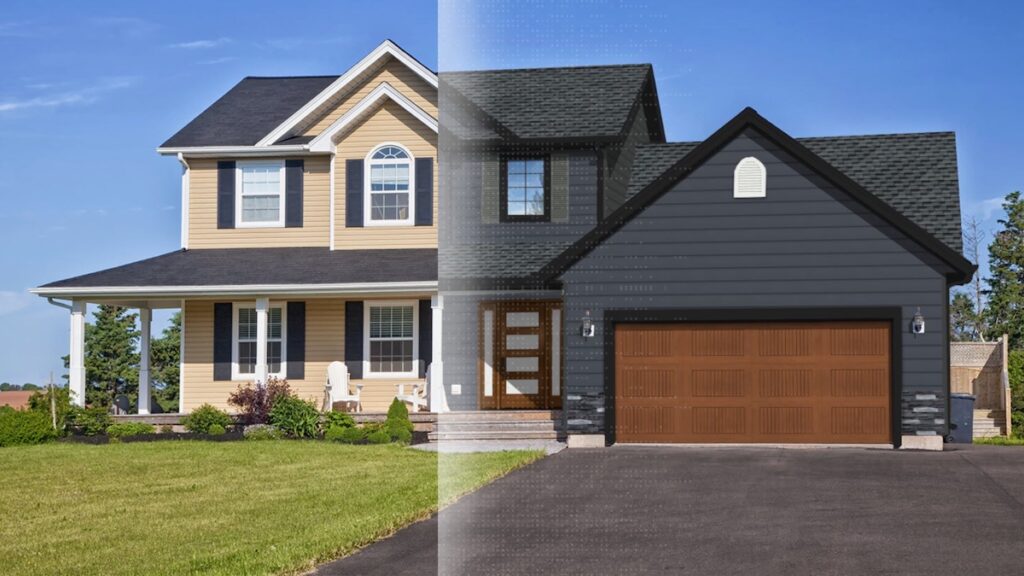
Home visualization software is a digital tool that applies real building products to a photograph of an actual house. You upload a photo of your home, select siding, roofing, windows, or paint from a manufacturer’s catalog, and see what the finished renovation will look like before anything is ordered or installed.
The category goes by several names: home exterior visualizer, exterior design software, or building product visualization software. The technology behind all of them is the same. A photograph of a real home, with products mapped onto its exterior surfaces, rendered accurately enough to inform a real purchasing decision.
The stakes explain the value. Americans spent more than $600 billion on home improvements and repairs in 2025, according to the Harvard Joint Center for Housing Studies. A large share of that goes to exterior products like siding, roofing, and windows, which homeowners pick from a catalog without ever seeing them installed on a house like their own. Visualization software closes that gap before the contractor order goes in.
How Home Visualization Software Works
The workflow has three steps.
1. Upload a photo. Most tools accept a standard front-facing photo taken on a phone. Higher resolution helps, but the tools are built for ordinary smartphone images.
2. Browse and apply products. The software presents a product library organized by category (siding, roofing, windows) and by manufacturer. Click a product to apply it to the home. The best tools use real product swatches, the exact colors and textures a manufacturer actually produces, so what you see on screen matches something you can order.
3. Review and share the result. The software renders your selections onto the house in real time. You can switch between options, compare them side by side, save a visualization, and send it to a contractor or family member before committing.
Better tools add surface segmentation. AI identifies and masks each surface on the home (siding, trim, soffit, roof) so you can change one without touching the others. Without it, recoloring the siding recolors the trim too, and you lose the ability to build a full exterior palette. This is the approach Renoworks uses, which is why its output reads like a photograph of the finished home rather than a texture dragged over a generic house.
Who Uses Home Visualization Software
Three groups use this software, each for a different reason.
Homeowners Planning an Exterior Renovation
Homeowners use visualization tools to take the uncertainty out of a large exterior purchase. Choosing a siding color or roofing material from a two-inch sample is a real leap of faith. The gap between “this looks nice in the showroom” and “this looks right on my house” is where most renovation regret lives.
Visualization closes that gap before any money changes hands. The common case: planning a repaint or re-side before requesting quotes, getting aligned with a co-owner on a big decision, or narrowing a shortlist of three products down to one.
Contractors and Remodelers
Contractors use visualization software as a sales and proposal tool. Showing a homeowner their own house with new siding beats showing a catalog photo of a different house or a sample board on the kitchen table. It removes the single most common objection to an exterior job: “I can’t picture it.”
Renoworks Pro is built for exactly this workflow: a white-labeled visualizer a contractor can embed on their own site or run from a tablet during a sales visit. A contractor who shows a photorealistic rendering of the finished job during the estimate is much harder to lose to a cheaper competitor holding a brochure.
Building Product Manufacturers
Manufacturers use visualization software to turn product discovery into purchase intent. A homeowner who has applied a manufacturer’s siding color to a photo of their own home is far more invested in that product than one who flipped past it in a catalog. Manufacturers planning a visualizer of their own can compare what it takes to build or license a manufacturer product visualizer.
Manufacturers also use the platform data: which products get visualized, in what combinations, in which regions. That data shapes product development, regional inventory, and marketing spend. More than 300 building product brands, including LP SmartSide, Ply Gem, AZEK, and Eldorado Stone, use Renoworks to power their visualization tools.
See it before you buy it.
Upload one photo. Real products on your actual home.
 The visualizer behind the +300 brands you trust






What You Can Visualize
Modern home visualization software covers most exterior surfaces.
Siding is the most common use case. Most tools support vinyl, fiber cement, engineered wood, and composite across the full range of manufacturer colors and profiles. The Renoworks siding visualizer draws from a deep catalog of real manufacturer product lines.
Roofing covers asphalt shingles (the dominant material by volume), metal panels, and clay or concrete tile. The Renoworks roof designer renders the full roof with accurate shingle pattern and granule texture, not a flat color fill.
Windows and doors are increasingly built in. Tools can swap window frame color, change door color and hardware, and show how a grid pattern or sidelights change the whole facade.
Paint is handled on its own because it coats existing surfaces rather than replacing them. The Renoworks paint visualizer lets you test colors on any exterior surface and compare palettes side by side without physical samples. You can see it in action in the Renoworks paint visualizer.
Stone, brick, and trim complete the palette. Renoworks includes manufactured stone veneer, brick, and trim colors that compose with your siding and paint choices, so you can judge the whole exterior at once.
How to Choose a Home Visualization Tool
Not every visualization tool is equally useful. Here is what separates the ones that inform a decision from the ones that just look impressive.
Real Products vs. Generic Color Swatches
The most important distinction: does the tool use real, purchasable products, or approximate color swatches?
A tool that shows your house in something close to “medium gray” is useful for direction. A tool that shows it in a specific manufacturer’s panel siding in a named color, available from the contractor who quoted you last week, is useful for a decision.
Look for tools that name the product and the manufacturer. If you cannot trace the visualization back to something a contractor can actually order, it is a design aid, not a decision tool.
Photo Accuracy
The rendering should look like your house, not a generic facade with a texture pasted on top. Good tools preserve the lighting, shadows, and architectural detail of the original photo. Siding on a dormer should follow the dormer’s real pitch. Trim should land where your trim actually is.
Test any tool on a photo of your own home before you trust it with a purchase. If the segmentation is off, with siding bleeding over the roofline or trim missed entirely, the tool will mislead you at the exact moment you need it to be right.
Independent Surface Control
The best tools let you change one surface at a time: siding apart from trim, roof apart from siding. That is what makes a full palette possible. Pair a dark siding with white trim and a charcoal roof, then swap the siding color and see whether the trim and roof still hold together.
Tools that paint a single material across the whole exterior limit you to one-dimensional choices.
Mobile Access and Sharing
Homeowners research on their phones. Contractors present on a tablet. A tool that only works well on a desktop loses its value at the moments renovation decisions actually get made.
Sharing matters just as much. Saving a visualization and sending a link lets a homeowner get a partner’s input before committing, and lets a contractor follow up with a visual reminder of what the homeowner liked.
Contractor Integration
For contractors, the most useful tools are white-labeled and embeddable on their own website, with a presentation mode that works at the kitchen table. Renoworks Pro is built for that sales workflow.
Stop competing on price.
Win on trust.
Original research from 20 top contractors on how they hold their price, earn a homeowner’s trust, and still get picked.
Check out the playbook →
Frequently Asked Questions
What is home visualization software? Home visualization software renders real building products, including siding, roofing, windows, doors, and paint, onto a photograph of your actual home, so you can see what an exterior renovation will look like before you buy or install anything.
Is home visualization software accurate? Accuracy depends on the tool. Tools that use real manufacturer swatches and AI surface segmentation produce results that closely match the installed product. Generic color tools that only approximate a shade can mislead, especially for textured materials like fiber cement, stone, or shake, where the texture matters as much as the color.
Can I use a home visualizer on my phone? Most modern tools, including the Renoworks platform, work on mobile. You can upload a photo from your phone’s camera, browse products, and save or share a visualization without ever opening a desktop browser.
Do I need a contractor to use a visualizer? No. Homeowner-facing tools are built for self-service. You can explore options on your own and bring a saved visualization into a contractor conversation, which usually shortens the quoting process because you arrive with a clear preference.
Is home visualization software free? Most manufacturer-branded tools, reached from a siding or roofing brand’s website, are free for homeowners. The Renoworks Home Design tool is free. Contractor-focused white-label platforms like Renoworks Pro are licensed.
What is building product visualization software? Building product visualization software is the B2B name for the same technology. It refers to white-labeled tools that manufacturers and contractors license to show their own product lines. Renoworks is the largest building product visualization platform in North America, used by more than 300 brands.
How does the technology work? Most tools combine image segmentation (AI finds and masks each surface in the photo) with texture mapping (the chosen product’s color and texture is applied to those areas). Higher-end tools also read the lighting in the original photo, so rendered materials look like they belong to the house instead of sitting on top of it.
Conclusion
Home visualization software closes the gap between “I think I want new siding” and “I know which product I am ordering and what it will look like installed.” For homeowners, it turns uncertainty into a confident decision on work that is expensive and hard to undo. For contractors, it removes the objection that stalls more exterior jobs than any other. For manufacturers, it ties product exploration straight to purchase intent.
The tools are free, need nothing more than a smartphone photo, and produce a shareable result in minutes. If you are planning any exterior change, whether siding, roofing, windows, paint, or stone, start with a visualization before you request quotes.
Try the Renoworks Home Design tool free, on a photo of your own home.
Add visualization to your sales process.
White-labeled tools, embedded in your website or presented on-site. Used by 300+ building product brands.
The visualizer behind the +300 brands you trust