The short version
- ChatGPT is great for the thinking around a siding project: research, material comparisons, color ideas, and homeowner communication.
- It can spark concept images, but it won't reliably keep a real home consistent from one version to the next, or tie a look to actual products.
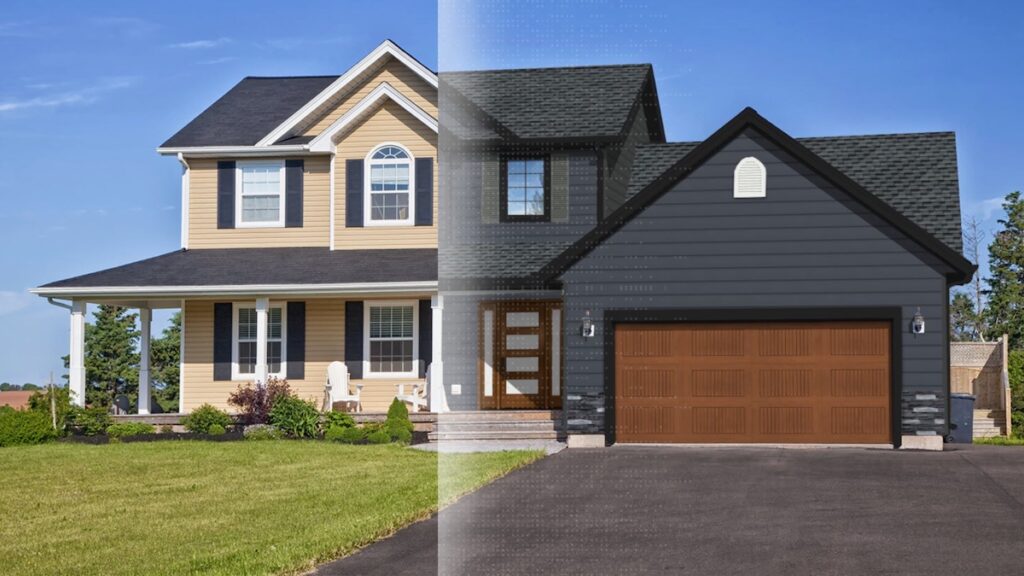
- A purpose-built visualizer like Renoworks shows real manufacturer products and colors on the homeowner's actual house.
- Best workflow: use ChatGPT to explore ideas, then a visualizer to finalize the design and help the homeowner choose.
If you're a siding contractor, chances are your homeowners are already using ChatGPT.
They may be asking it which siding material is best, what colors are trending, what works with their roof, or even uploading a house photo and asking ChatGPT to redesign it.
That doesn't mean you need to compete with ChatGPT.
In fact, ChatGPT can be a practical tool for contractors and homeowners alike, if you use it for the right things.
For siding contractors, ChatGPT is useful for ideation, research, homeowner communication, and planning.
But when it's time to show a homeowner what their actual home will look like with real manufacturer products and colors, a purpose-built visualization tool like Renoworks is a better fit.

Can ChatGPT Design Siding?
Yes, but primarily in a conceptual sense.
ChatGPT can help contractors and homeowners explore siding styles, materials, color combinations, and design directions. It can also help turn a vague idea into a more specific design brief.
For example, you can use ChatGPT to ask:
- What siding styles work well on a Craftsman home?
- What are the advantages and disadvantages of vinyl versus fiber cement?
- What siding colors work with a dark roof?
- What exterior color combinations work well for a modern farmhouse?
- How could I combine horizontal siding and board and batten?
- What siding materials make sense for homes in different climates?
- What are some popular exterior styles for residential remodels?
ChatGPT can also help generate visual concepts or prompts for image generation. If a homeowner uploads a photo, ChatGPT can provide inspiration for a potential remodel.
That's useful for getting the conversation started.
But there are limitations.
ChatGPT doesn't automatically know the exact products you're going to install, and an AI-generated image isn't necessarily an accurate representation of the actual home.
The result may look photorealistic while still being generic, inconsistent, or impossible to execute exactly as shown.
That's why it's important to think of ChatGPT as an idea-generation and communication tool, rather than your final siding visualization tool.
What ChatGPT Can and Cannot Do
The easiest way to think about ChatGPT is as a powerful general-purpose assistant.
ChatGPT can help with the thinking and communication around a project, but it isn't purpose-built for siding visualization, measurements, or project management.
- Design research. Compare vinyl, fiber cement, engineered composite wood, metal, natural wood, shake, lap siding, and other siding options.
- Color inspiration. Brainstorm color combinations based on architectural style, roof color, regional trends, or homeowner preferences.
- Design concepts. Explore different exterior styles and generate prompts or conceptual images to help homeowners communicate what they like.
- Homeowner education. Explain technical siding terminology and material differences in language a homeowner can understand.
- Communication writing. Draft follow-up emails, project updates, scope summaries, proposals, and other customer-facing communications.
- Preserve every detail of a home's structure between AI-generated images
- Verify measurements or square footage
- Perform an accurate takeoff
- Produce manufacturer-specific product specifications
- Guarantee that a color shown is an actual manufacturer's color line
- Provide a precise material list
- Create a build-ready installation plan
- Replace professional judgment around installation, building code, or site-specific conditions
In other words, ChatGPT is useful for the concept. It isn't a replacement for the tools and expertise required to turn that concept into a real siding project.
The Problem With AI-Generated Home Designs
One of the biggest challenges with using ChatGPT for exterior home design is consistency.
You can upload a house photo and ask ChatGPT to change the siding.
The result might look impressive.
Then you ask ChatGPT to try another color.
It generates another image.
But look closely.
- The windows may have moved.
- The roofline may have changed.
- The garage might look different.
- A gable, soffit, fascia, trim, or other architectural detail may have disappeared or changed.
- The proportions of the house may even be slightly different.

That creates a problem that isn't always obvious at first.
You're no longer comparing different siding options on the same house.
You're comparing different versions of the house.
For brainstorming, that's fine.
For making a major remodeling decision, it's not ideal.
A purpose-built exterior visualization tool is designed around a different principle: keep the home consistent while you change the design.
That gives you a more meaningful comparison between different products, styles, and colors.
ChatGPT vs. Siding Design Tools
This is where ChatGPT and purpose-built design tools serve different purposes.
Think of ChatGPT as your language, research, and brainstorming assistant.
Think of an exterior visualization tool as your design and sales tool.
“What kind of siding should I consider?”
“Which of these real siding products and colors looks best on this house?”
That's a significant difference.
Purpose-built visualization tools are designed around the remodeling workflow. Depending on the platform, they can support everything from visual design and presentations to measurements, estimating, and proposals.
Tools such as Hover and other contractor software can address measurements, takeoffs, or project workflows. CAD software such as AutoCAD or Chief Architect is built for technical drawings and detailed design. ArchitectGPT focuses on AI-powered architectural visualization.
Renoworks focuses specifically on exterior visualization and helping contractors show homeowners what real products and colors can look like on their homes.
The goal isn't to replace every other piece of contractor software.
It's to use the right tool for the right job.
Why Real Manufacturer Products Matter
There's another important difference between ChatGPT and a purpose-built siding visualization tool.
ChatGPT can generate a beautiful exterior concept without necessarily telling you what products created it.
A homeowner might say: “I love this siding color.”
But what is the actual product?
- Which manufacturer makes it?
- Is it available through your supplier?
- What is the exact color?
- Can you source it?
- Can it actually be installed?
An AI-generated image can provide inspiration without providing an executable specification.
A purpose-built visualization platform can take the next step by showing homeowners real manufacturer products and colors.
For example, a homeowner might be interested in a James Hardie product, LP SmartSide, CertainTeed, or another specific product line.
Rather than generating a generic version of that material, you can show the homeowner an actual product and color option and visualize it on their home.

That's a much more useful place to end a sales conversation.
Win on trust.
Twenty top contractors on how they hold their price against a cheaper bid, and still win the job.
Check out the playbook →
How Contractors Can Use ChatGPT
Siding visualization is only one potential use for ChatGPT.
For contractors, one of its biggest benefits is reducing the time spent on repetitive communication and administrative work.
Here are some practical ways to use ChatGPT:
- Write homeowner follow-up emailsGive ChatGPT your notes from a sales appointment and ask it to draft a professional follow-up email. You can then review and personalize it before sending it.
- Write proposalsChatGPT can help organize information and improve the wording of a proposal. It can turn technical information into homeowner-friendly language while helping you maintain a consistent presentation.
- Create a scope of workGive ChatGPT the basic details of a project and ask it to organize them into a clear scope of work. Always review the output against your actual project requirements.
- Explain materialsIf a homeowner doesn't understand the difference between vinyl, fiber cement, engineered wood, or metal, ChatGPT can help you create a simple explanation.
- Brainstorm marketing ideasUse ChatGPT to brainstorm social media posts, ad concepts, blog topics, video scripts, email campaigns, and other content.
- Build training materialsChatGPT can help contractors create sales scripts, training exercises, checklists, and internal documentation.
- Organize project informationUse ChatGPT to help structure project timelines, cost breakdowns, client communications, and other information.
The key is to remember that AI-generated information still needs to be reviewed.
Don't assume ChatGPT knows your local building requirements, your manufacturer's installation specifications, or the exact details of a particular project.
Use ChatGPT to streamline your work, not to replace your expertise.
Use ChatGPT to Start the Design Conversation
There's also a smart way contractors can use ChatGPT with homeowners.
Instead of trying to stop homeowners from bringing AI-generated ideas to the table, encourage them to use ChatGPT as part of their research.
A homeowner might come to you and say: “I asked ChatGPT about siding options and I think I want a modern farmhouse look.”
Great.
Now you have a direction.
You can take that concept and translate it into something real.
- Maybe that means horizontal siding in a particular manufacturer's color.
- Maybe it's board and batten on the front elevation with horizontal siding elsewhere.
- Maybe it's siding with stone as an accent.
- Maybe the homeowner likes the color combination but needs a different product because of availability or budget.
That's where your expertise matters.
ChatGPT can help the homeowner figure out what they like. You help them figure out what will actually work.
Then Use a Visualization Tool for the Final Design
Once you've narrowed down the possibilities, move the conversation into an exterior visualization tool like the Renoworks Siding Visualizer.
Instead of asking the homeowner to imagine the finished project, put their house on the screen.
Then show them real options.

- Change the siding color.
- Try another siding profile.
- Compare materials.
- Add an accent.
- Try a different trim color.
- Compare a vertical siding option with a horizontal one.
- Keep the rest of the home consistent.
Most importantly, show them manufacturer products and colors you can actually source and install.
This gives the homeowner confidence in the decision, and it gives you a much stronger sales presentation.
One Renoworks contractor described exactly this challenge: homeowners were getting stuck because there were so many colors, styles, and brands to choose from. After putting their actual house into the visualizer, the homeowners were able to choose a color and style and sign a contract for a $45,000 project that same day.
That's the difference between generating inspiration and helping someone make a decision.
Don't Try to Make ChatGPT Do Everything
It's tempting to look at the growing capabilities of ChatGPT and assume you can replace all your other tools with one AI assistant.
For some tasks, that may be possible.
But a siding contractor doesn't need one tool that does everything.
You need the right tool for each stage of the job.
- Use ChatGPT for research, brainstorming, communication, and planning.
- Use your estimating and project management systems for estimates, scopes, measurements, material lists, project timelines, and other operational work.
- Use specialized CAD or architectural software when you need technical drawings or 3D models.
- And use an exterior visualization tool when you need to help a homeowner make a visual design decision.
That's a much more practical approach to AI for contractors.
The Best Approach: Use Both
You don't have to choose between ChatGPT and an exterior visualization tool.
Use them for what they do best.
- Research
- Material comparisons
- Design inspiration
- Color ideas
- Homeowner education
- Communication
- Marketing
- Planning and administrative tasks
- Visualizing the actual home
- Comparing design options consistently
- Showing real siding products
- Showing real manufacturer colors
- Helping homeowners make final selections
- Turning design ideas into an executable siding project
The goal isn't to replace one with the other.
It's to move the homeowner through the right process:
ChatGPT can help with the first two.
A purpose-built exterior visualization tool like Renoworks is designed to take over when the homeowner is ready for the last three.
Final Takeaway
So, can ChatGPT design siding for contractors?
Yes, but it's better at helping you think about the design than helping you create the final, product-specific design.
Use ChatGPT to research siding materials, explain options to homeowners, explore color combinations, generate inspiration, write communications, and make your day-to-day work more efficient.
But when it's time to show a homeowner exactly what their house will look like, don't leave the final decision to a generic AI image generator.
Use a purpose-built exterior visualization tool that lets you control the changes, keep the home's structure consistent, and work with real products and colors you can actually source and install.
Let ChatGPT generate the ideas. Let your expertise shape the design. Then use visualization to help the homeowner see and choose the real thing.