TL;DR
A siding visualizer lets you preview new siding on a photo of your actual home before committing to a $20,000+ purchase. The five tools we trust most, and who each one is for:
- Renoworks Pro: best overall and best for cross-brand comparison. The pro platform behind many of the branded tools below; start with the free version.
- Hover: best when you want measured drawings alongside the visualization.
- Hyphen Solutions: the platform behind roughly one in three new US homes. You'll meet it through a builder's design center, not directly.
- CertainTeed ColorView: the best free option once you've narrowed to CertainTeed; shows siding, roofing, and trim in one view.
- Coohom: best when siding is one decision inside a whole-home redesign.
Not sure where to start? The free Renoworks Siding Visualizer uses the same technology as the pro and partner tools, so what you see is what you'll get.
Stop competing on price.
Win on trust.
Original research from 20 top contractors on how they hold their price, earn a homeowner’s trust, and still get picked.
Check out the playbook →
Introduction
You can repaint a wall in an afternoon. New siding is a different conversation. It’s the most visible decision on your house, it lasts twenty-plus years, and the average remodel runs north of $20,000 before labor. Most homeowners commit to all of that based on a six-by-six-inch sample held against a wall in the wrong light.
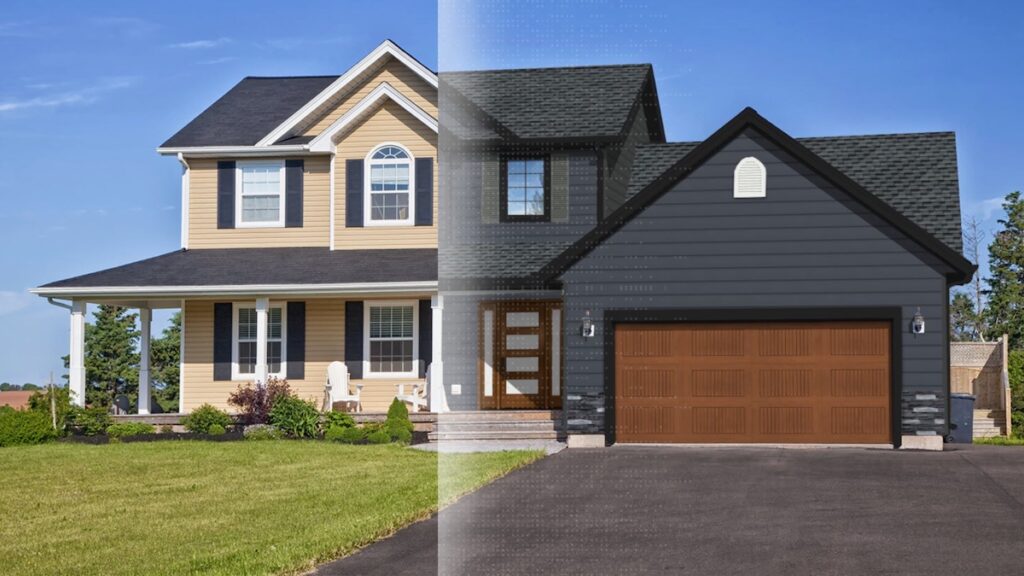
A siding visualizer fixes that. Upload a photo of your actual home and you can see, not imagine, what vinyl, fiber cement, brick, or board-and-batten will look like before the first crew shows up. The category has come a long way: the early visualizers were clunky drag-and-drop demos; the newer ones use AI to detect surfaces automatically and render results that look closer to a real photograph than a Photoshop comp.
But “siding visualizer” now means a dozen different things. Some are tools manufacturers built to sell their own products. Some are universal apps with hundreds of materials. A few are professional platforms used by contractors during sales conversations. Picking the wrong one wastes an evening; picking the right one saves you a five-figure mistake.
This guide compares the five visualizers we use most often: what each one is best at, where each one falls short, and which one fits your situation.
What Is a Siding Visualizer?
A siding visualizer is a tool that lets you preview new siding on a real photo of your home before you commit to buying it. The good ones detect the wall surfaces automatically, let you swap materials and colors with a click, and produce results photorealistic enough to share with a spouse, a contractor, or an HOA without anyone squinting at it.
The category breaks down into four rough buckets:
- Professional platforms. Tools like Renoworks Pro and Hover used by contractors and designers during quoting and sales. Highest fidelity, broadest catalogs, often paid.
- Manufacturer-branded visualizers. Built and offered free by a specific brand (CertainTeed, LP SmartSide, James Hardie). Highly accurate for that brand’s product line; less useful for cross-brand comparison.
- Universal design tools. Apps like Coohom, Planner 5D, or Homestyler that include siding as one feature among many. Great for whole-home redesigns; less specialized for siding decisions.
- Enterprise builder platforms. Systems like Hyphen Solutions that bundle visualization inside a larger builder/supplier suite. You don’t shop one directly; you get it through your builder.
Which one is right depends on how seriously you’re shopping, how locked-in you are to a brand, and whether you’re working with a contractor or builder.
Why Use One Before Picking Your Siding?
A visualizer is not a gimmick. It’s a decision-making tool, and the three reasons it pays off look different depending on who’s using it.
If you’re a homeowner, it kills decision regret. The single most common siding mistake is choosing a color or material that “looked great in the showroom” and feels wrong on your specific house, in your specific lighting, against your specific roof and landscaping. A visualizer rules that out in ten minutes.
If you’re working with a contractor, it accelerates the conversation. Contractors using Renoworks Pro close jobs averaging $20,000 to $30,000, roughly double the national remodeling average of $8,800 to $14,000, partly because clients say yes faster when they can see exactly what they’re paying for.
If you’re a manufacturer or pro, it’s a lead-generation engine. Homeowners who visualize a product on their own home convert to a sale 72% of the time. That’s not a marketing-collateral statistic. It’s the difference between a brochure and a buying decision.
In short: a visualizer doesn’t just show what your siding will look like. It compresses the gap between “I think I want that” and “I’m signing the contract.”
See it before you buy it.
Upload one photo. Real siding on your actual house.
 The visualizer behind the +300 brands you trust






What to Look for in a Siding Visualizer
Not every visualizer is built the same. As you compare the five below, here are the seven things that actually matter:
- Surface detection accuracy. Does the tool correctly identify the siding panels, or do you have to manually mask them? AI-driven detection saves 80% of the work.
- Photorealistic rendering. Some tools produce flat color-swap previews that look obviously fake. Others render with proper shadows, textures, and lighting. Those are the ones you can actually show to a contractor.
- Product catalog depth. A visualizer with only 12 generic siding swatches is a demo. A visualizer with hundreds of real, in-market products from real manufacturers is a tool.
- Cross-brand comparison. Can you put vinyl next to fiber cement next to engineered wood, or are you locked to one manufacturer’s catalog?
- Side-by-side and before/after views. A/B comparison is what closes decisions. If you can’t see “current home” vs. “redesigned home” in the same view, you’ll second-guess every choice.
- Sharing and saving. Can you save your design and send it to a partner, a contractor, or an HOA without screenshots and email attachments?
- Pricing transparency. Free, freemium, or contractor-quoted? The visualizer you’ll actually use is the one you can sit down with on a Tuesday night without filing a sales lead.
How We Evaluated These Tools
We tested each visualizer against the same Calgary single-family home photo (a two-story house with a mix of vinyl siding, a dark asphalt roof, and white trim) and walked through the same scenarios: changing the siding to a contrasting color, swapping materials entirely, and showing the result to a non-design partner to gauge realism. We also pulled in publicly available contractor feedback and our own data from running the underlying technology behind several of these tools.
Each pick below has a Best for badge to point you to the audience it serves best, three strengths grounded in how the tool actually behaves, and an honest limitation. We’re not ranking by popularity; we’re ranking by fit.
The Top 5 Siding Visualizers in 2026
Here’s how the five tools compare. We’ve ordered them by overall fit: the ones at the top fit the widest range of users, and each one below is best for a more specific situation.
1. Renoworks Pro
Best for: Contractors and remodelers running design sessions with homeowners · Manufacturers building branded visualizer experiences · Homeowners who want the most accurate cross-manufacturer comparison.
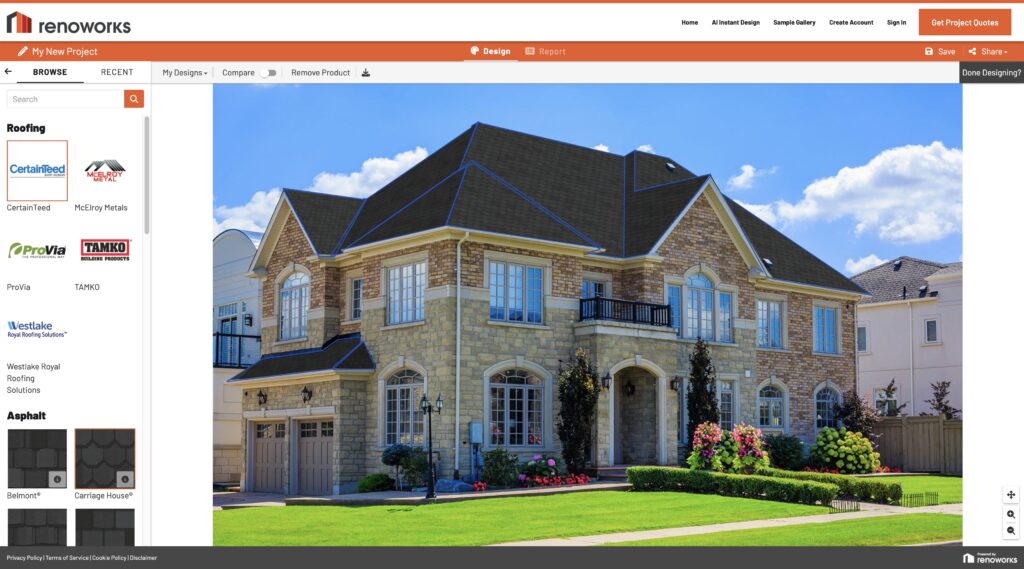
Renoworks Pro is the professional-grade platform powering visualizer experiences across many of the largest building-products brands, including the branded tools you’ll see further down this list. It’s used by contractors during in-home consultations because the catalog depth is real (350+ manufacturer integrations covering CertainTeed, LP SmartSide, Alside, Ply Gem, ProVia, Royal, Westlake, and others) and the rendering looks like a photograph, not a comp. AI Instant Design applies siding in under 60 seconds; full 3D models take 5–15 minutes with drag-and-drop product placement.
Strengths
- 350+ real-brand integrations with accurate SKUs and colors. You can compare vinyl from Alside against fiber-cement from CertainTeed in the same view, which most manufacturer-branded visualizers can’t do.
- Photorealistic AI rendering that contractors put in front of homeowners in real sales calls, with the same job-winning fidelity and no separate “client presentation” step.
- Conversion proof. Partners using RWP report up to 3× upsell revenue and 60% improved close rates, and 83% of homeowners prefer it as a way to evaluate options.
2. Hover
Best for: Homeowners who already have a contractor and want measured drawings alongside the visualization · Contractors who quote off mobile-captured site photos.
Hover started life as a measurement-from-photos company and grew into a visualizer. You take photos of your home with their iPhone app, Hover stitches them into a 3D model with real dimensions, and you can swap siding products against that model. The measurement side is what makes Hover different: the visualization sits on top of actual exterior measurements your contractor can quote from.
Strengths
- Measurement-grade 3D. Most visualizers are 2D photo overlays. Hover’s 3D model means the visualization is dimensionally accurate, which matters when the contractor is pricing a job from the same file.
- Real manufacturer catalogs. James Hardie, CertainTeed, Alside, LP Building Solutions, and other major brands are all integrated.
- One platform for visualization + quoting. The contractor doesn’t have to re-measure or rebuild your design in a separate tool.
Where it falls short
- The capture process takes effort. Most other visualizers let you upload one existing photo. Hover wants you to walk around your house with the app taking guided photos. Better data, more work.
- The catalog, while real, is narrower than Renoworks Pro’s. Hover is excellent at the tools-it-has; if your contractor is recommending a brand Hover doesn’t carry, you’re stuck.
3. Hyphen Solutions
Best for: Homeowners working with a production homebuilder · Builders and large-format contractors running design centers · Anyone whose siding decision is happening through a builder’s design-center process, not a one-off remodel.
Hyphen Solutions is not a homeowner-facing visualizer in the same sense as the others on this list. It’s the enterprise builder platform behind roughly one in three new homes built in America. It’s an end-to-end system covering supply chain, accounting, construction management, and yes, design visualization for the homeowner-selection process. The visualization piece (HomeSight and related modules) is what builders use to walk new-home buyers through siding, roofing, and trim selections during the design-center appointment.
Strengths
- Massive embedded reach. If you’re buying a new-construction home in the US, there’s a good chance the design-center experience you’ll use is Hyphen-powered, whether or not anyone tells you the platform’s name.
- Tight integration with the rest of the build. Selections in the visualizer flow directly into the builder’s accounting, ordering, and supply-chain systems. Fewer “we couldn’t get that color” moments later.
- Built for the design-center workflow specifically. Guided selection paths, option packages, and change-order trails, not just a free-form visualizer.
Where it falls short
- You can’t access it directly. Hyphen is sold to builders, not homeowners. If your builder doesn’t use it, you can’t use it.
- Visualization is one feature inside a much larger platform. Depth and realism aren’t the headline. For a remodel or a one-off shopping session, this is the wrong tool.
4. CertainTeed ColorView
Best for: Homeowners specifically considering CertainTeed siding, roofing, or trim, especially anyone making decisions about all three together.
ColorView is CertainTeed’s free homeowner visualizer, and it does one thing better than almost any tool on this list: it shows siding, roofing, and trim in the same view, so you can see how a sage-green vinyl reads against a charcoal shingle and white trim instead of guessing. Upload a photo of your home (or start from one of their pre-built houses) and the tool walks you through each surface. It’s powered by Renoworks under the hood (full disclosure), which is why the rendering quality is closer to the professional tools than to a generic free demo.
Strengths
- Combined exterior view. Most free visualizers do siding or roofing in isolation. ColorView coordinates the full exterior, which is how the decision actually gets made.
- Accurate CertainTeed product library. Real SKUs, real colors, accurate textures. If you’re shopping CertainTeed specifically, the rendering you see is what you’ll actually get.
- Free, no signup gate. Start visualizing in under a minute.
Where it falls short
- It’s locked to the CertainTeed catalog. You can’t cross-shop vinyl from one brand against fiber cement from another in the same view. That’s what Renoworks Pro or Hover are for.
- The tool occasionally errors under load. If it doesn’t load on your first visit, refresh. (Not a deal-breaker, but worth knowing.)
5. Coohom
Best for: Homeowners doing whole-home redesigns where siding is one decision inside a bigger project (interior + exterior + landscaping).
Coohom is a general-purpose 3D home design platform, with siding as one feature alongside interior layout, kitchen design, and furniture placement. If you’re already redesigning a floor plan or planning a full renovation, Coohom is the rare tool that handles the whole house in one place. For a siding-only decision, it’s less specialized than the dedicated tools above, but the trade-off can be worth it.
Strengths
- One platform for the whole home. If you’re rethinking the kitchen and the exterior in the same project, Coohom is the only tool on this list that covers both.
- Easy to learn. The UI is friendly for non-designers; you’ll be applying siding within five minutes of signup.
- Mobile-friendly. Full functionality on phone or tablet, useful for design conversations on the go.
Where it falls short
- Generalist depth. The siding catalog is broader-feeling but shallower on specific manufacturer products. You won’t find the same SKU-level accuracy as ColorView or Renoworks Pro.
- Free is a freemium starter. Full features sit behind a paid plan, and the price-vs-value math doesn’t always work if you’re only using the siding piece.
Related Comparisons
Looking for more visualizer comparisons? You may also like:
- Top 5 Exterior House Design Apps That Actually Work
- Hover vs. Hyphen Solutions: Which Platform Fits Your Contracting Business
- Renoworks vs. Hover
- Best House Colors for a Gray Roof: Expert Picks
Conclusion
A siding decision is decision-insurance for the most visible $20,000 you’ll spend on your house. The right visualizer doesn’t just tell you what teal vinyl looks like. It routes you toward the right product, the right partner, and the right confidence to sign the contract.
For most homeowners, the right starting point is the free Renoworks Siding Visualizer: broad enough to compare across brands, accurate enough that your contractor can pick up the conversation where you left it, and built on the same technology powering several of the manufacturer tools above. If you’ve already narrowed to a brand, jump to that brand’s visualizer. If you’re early-stage and exploring, stay broad.
Whichever you pick, don’t sign the work order until you’ve seen the result on your own house. The samples lie. The visualizer doesn’t.
See it before you buy it.
Upload one photo. Real siding on your actual house.
The visualizer behind the +300 brands you trust
Related Articles
More on the tools, tactics, and platforms exterior contractors use to sell more work and close faster.