TL;DR
A window and door visualizer shows new windows and doors on a photo of your actual house before you buy. The five we trust most:
- Renoworks: best overall and best for comparing brands. The platform behind many of the branded tools below.
- Hover: best when you want measurement, an estimate, and a signable proposal under the visual.
- ProVia Envision: best for doors, with the deepest entry-door configurator (glass, grids, hardware, color).
- Infinity from Marvin: best single-brand preview, with instant AI masking and no tracing.
- Renewal by Andersen: best for previewing windows and patio doors in augmented reality.
Fastest start: the Renoworks Window Visualizer.
Introduction
You can swap a cabinet pull in five minutes. New windows and doors are a five-figure, twenty-five-year decision, and most homeowners still make it off a one-inch frame sample held against the siding in the wrong light.
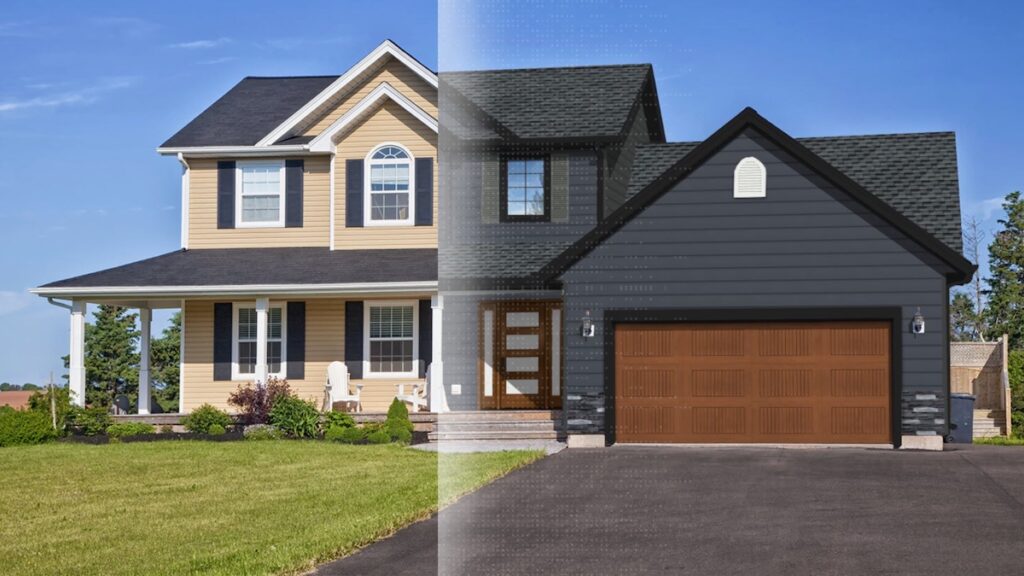
A visualizer fixes that. Upload a photo of your home and you can see real black-frame casements, a sliding patio door, or a new entry door on your actual house before anyone measures a rough opening. The best of them use AI to detect the openings automatically and render results that look like a photo, not a Photoshop comp. Below are the five we trust most: what each is best at, where each falls short, and who should use it.
The 5 Best Window and Door Visualizers at a Glance
| Tool | Best for | Coverage |
|---|---|---|
| 1. Renoworks | Comparing brands; pro design sessions | Windows + doors + exterior |
| 2. Hover | Measurement to signed proposal | Windows-led |
| 3. ProVia Envision | Door-focused configuring | Windows + doors |
| 4. Infinity from Marvin | One-brand preview, no tracing | Windows + doors |
| 5. Renewal by Andersen | Augmented-reality preview | Windows + patio doors |
What Is a Window and Door Visualizer?
A window and door visualizer previews new windows and exterior doors on a real photo of your home. The good ones detect the openings automatically, let you swap styles, colors, glass, grilles, and hardware with a click, and look real enough to share with a spouse, a contractor, or an HOA. They fall into four buckets:
- Professional platforms (Renoworks): highest fidelity, broadest catalogs, windows and doors in one view.
- Contractor field platforms (Hover): pair the visual with measurement, estimating, and proposals.
- Manufacturer-branded tools (ProVia, Infinity from Marvin, Renewal by Andersen): accurate for that one brand, not for cross-shopping.
- Generic AI photo swaps: pretty renders from a text prompt, but tied to no real catalog, so you can't actually order what you see.
Why Use One Before You Buy?
It is a decision-making tool, not a gimmick. The payoff depends on who you are.
Homeowner
Kills decision regret. Black frames that look crisp on a white farmhouse can read heavy on a tan ranch. See it on your house before it is in for 25 years.
Contractor
Speeds the close. A photoreal preview of the customer's own home mid-conversation removes the biggest reason buyers stall.
Manufacturer
Generates leads. Infinity from Marvin launched AI auto-recognition for exactly this: deeper engagement and qualified leads to dealers.
See it before you buy it.
Upload one photo. New windows and doors on your actual house.
 The visualizer behind the +300 brands you trust






What to Look For
- Auto-detection. Does it find your windows and doors, or make you trace each one?
- Photorealism. Real frame depth, glass reflection, and hardware, not a flat overlay.
- Catalog depth. Real, orderable product lines, not generic shapes.
- Windows and doors together. See them in one view, the way the house reads.
- Cross-brand. Compare an Andersen against a Pella, or stay brand-locked.
- Measurement. For contractors: does the same file price the job?
How We Evaluated
We ran each tool on the same two-story home photo (aging white double-hungs, a dated front entry, mixed brick and siding), swapped in black casements and a new door, and judged realism with a non-design partner. We also drew on contractor feedback and our own data from running the technology behind several of these tools. Each pick gets a Best for, three real strengths, and one honest limitation. We rank by fit, not popularity.
The Top 5 Window and Door Visualizers
Renoworks
Best for: Contractors and manufacturers running design sessions, and homeowners who want to compare brands on their own house.
- 300+ real manufacturer libraries. Compare an Andersen window against a Pella, or pair new windows with a new door, in one view. The brand-locked tools can't.
- AI in under a minute. It detects the windows and doors automatically, so there's no manual tracing.
- Close-grade rendering. Photoreal enough to sell with live, and it powers several branded tools further down this list.
Heads up: the full platform is built around a pro workflow (sales calls, design reports, branded portals). For a quick ten-minute look, start with the standalone Window and Door Visualizer.
 Before
 After
AfterHover
Best for: Contractors who want measurement, an estimate, and a signable proposal sitting under the visualization.
- Measurement-grade 3D. Not a flat overlay. The 3D model is dimensionally accurate, so the same file that shows new windows also prices the job.
- One mobile app. Capture, measure, and estimate run in the same app on the jobsite.
- Real catalogs. Major window brands are integrated, and Pella even offers a Hover-powered path.
Heads up: it wants a guided app walk-around, not a one-photo upload, and it leans windows over deep door configuration.
ProVia Envision
Best for: Anyone door-focused who wants a true configurator, down to the glass, grids, hardware, and color.
- Best-in-class door config. Entry doors are ProVia's flagship. Build one the way you'd actually order it, then see it on your house.
- 2D, 3D, and AR in one ecosystem. A quick photo mock, an accurate 3D model, or AR through the app.
- Orderable, with a clean handoff. Every option is a real ProVia product, and the design saves with a dealer access code for a fast quote.
Heads up: locked to the ProVia catalog, and saving designs needs an account.
Infinity from Marvin
Best for: Homeowners shopping Infinity from Marvin who want a photoreal preview with zero tracing.
- The original AI auto-recognition. Upload a photo, click a window or door, swap the product. No outlining anything.
- Photoreal output, because it runs the same Renoworks engine as the pro platform.
- Accurate product library. Real Infinity window lines, door styles, and colors. What you see is what you get.
Heads up: single-brand, so you can't cross-shop it or pull in siding and roofing.
Renewal by Andersen
Best for: Homeowners who want to see windows and patio doors in AR, from a brand they already know.
- Augmented reality. Judging scale and proportion in AR beats a flat overlay, especially for big patio doors.
- A name homeowners trust. A household replacement brand lowers the bar to starting a design.
- Accurate to the line. Real Renewal by Andersen styles and colors, so the preview matches the quote.
Heads up: brand-locked and tied to a full-service sales model, and AR quality depends on your device and lighting.
So Which One Should You Choose?
- Cross-shopping brands, or windows and a door together: start with Renoworks, the only pick not locked to one manufacturer.
- Selling as a contractor: Renoworks for presentation-grade rendering during the design session.
- Doors are the focus: ProVia Envision has the deepest configurator.
- Locked on a brand: Infinity from Marvin for the cleanest preview, or Renewal by Andersen for AR. (Pella's tool, also built on Renoworks, is a strong option too.)
Don't guess. See it first.
Upload one photo. Compare real windows and doors on your home.
The visualizer behind the +300 brands you trust
Related Comparisons
- Top 5 Roofing Visualizers That Actually Work
- Top 5 Siding Visualizers That Actually Work
- Home Window Style: A Complete Guide for Contractors and Homeowners
- Front Door Colors That Turn Heads and Win Over Buyers
Conclusion
Windows and doors are decision-insurance for the most visible five figures on your house. The right visualizer routes the homeowner to the product and the confidence to sign, and the contractor to a faster close.
For most people, start with the Renoworks Window and Door Visualizer: broad enough to compare brands and see windows and doors together, and built on the same technology powering several of the tools above. Whichever you pick, don't sign the work order until you've seen it on your own house. The samples lie. The visualizer doesn't.