The short version
- ChatGPT is excellent for exterior design inspiration: brainstorming styles, comparing materials, and building better image prompts.
- It can generate concept images, but it will not reliably keep your actual house consistent from one version to the next.
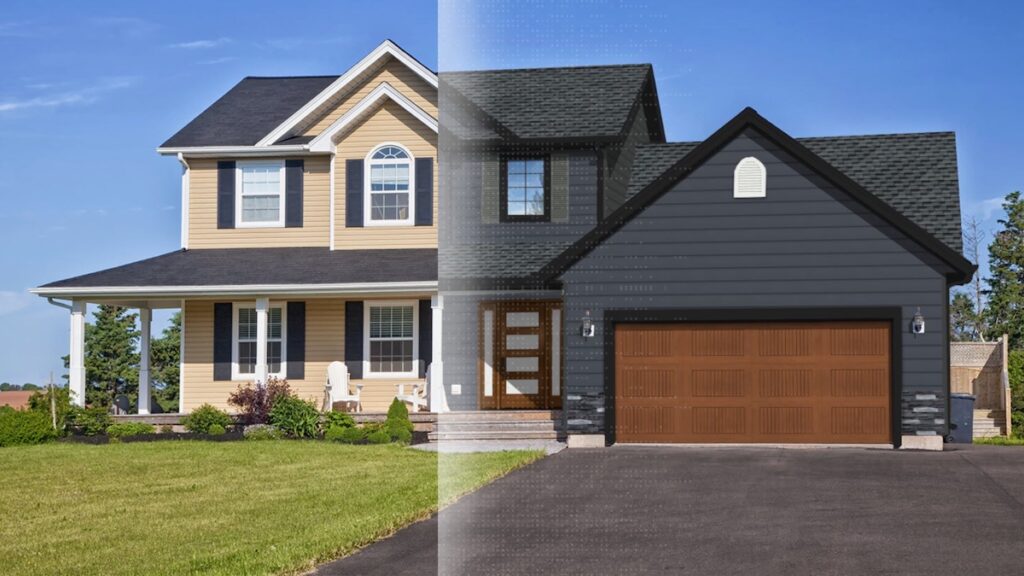
- A purpose-built visualizer like Renoworks starts from a photo of your real home and applies real manufacturers’ products and colors.
- Best workflow: use ChatGPT to decide what you want, then a visualizer to see it on your house and turn it into something buildable.
Yes, ChatGPT can be used for exterior design. It can help homeowners brainstorm ideas, compare materials, define an architectural style, create design prompts, and even generate images of potential exterior designs.
But there is an important limitation: a beautiful AI-generated image isn’t necessarily an accurate representation of your actual house.
If you’re looking for inspiration, ChatGPT and other AI image-generation tools can be extremely useful. If you’re trying to decide what a new siding color, roof material, front door, or window style will look like on your actual home, a dedicated exterior visualization tool is often a better fit.
The key is understanding what each design tool is designed to do.

What ChatGPT Can Do for Exterior Design
ChatGPT is primarily a text-based AI assistant, but its image capabilities make it increasingly useful for exterior design projects.
You can use ChatGPT to explore a different architectural style, develop a design brief, compare materials, and create prompts for AI image generation.

For example, you could ask:
“I have a 1990s two-story home with brick on the lower half. I want to make it look more modern without completely changing its character. What siding, roof, window, trim, and front door combinations should I consider?”
ChatGPT can turn that conversation into several design concepts.
It can also help you explore a modern farmhouse, traditional, contemporary, craftsman, or other style direction before you begin making changes to the actual house.

Research and Planning Tasks
One of the most practical ways to use ChatGPT for exterior design is during the planning stage.
You can ask ChatGPT to:
- Compare siding materials
- Compare roof material options
- Explain different architectural styles
- Suggest a color palette
- Recommend exterior color combinations
- Develop questions for a contractor
- Create a project scope or design brief
- Suggest ways to redesign an outdated exterior
- Compare different window and trim combinations
- Research maintenance considerations
- Develop landscape design ideas
- Suggest improvements to a porch, front porch, walkway, or front door
For example, if you know you want a modern farmhouse exterior but don’t know where to start, ChatGPT can provide suggestions for siding, roofing, windows, a front door, porch details, and landscaping.
It can also explain why certain materials work together and help you narrow down your choices.
This makes ChatGPT particularly useful early in the process, when you’re still figuring out what you want.
Prompt and Concept Support
ChatGPT can also help you write better prompts for AI image-generation platforms such as Midjourney, Adobe Firefly, Canva AI, DALL-E, Bing Image Creator, or Stable Diffusion.

You might start with:
“I want a modern farmhouse exterior.”
ChatGPT can turn that simple idea into a much more detailed prompt:
“Create a modern farmhouse exterior with warm white horizontal siding, dark bronze windows, a natural wood front door, a charcoal roof, simple white trim, and understated natural stone accents.”
The resulting prompt gives an AI image-generation tool much more direction.
You can also ask GPT to modify the prompt:
“Keep the same exterior design, but make the siding darker and replace the stone with painted brick.”
This kind of iterative generation can be a great way to explore possibilities.
However, there’s an important distinction between generating a concept and accurately visualizing a remodeling project.
How ChatGPT Compares to Exterior Design Tools
The biggest difference between ChatGPT and a purpose-built exterior design tool is what you’re trying to accomplish.
| ChatGPT & general AI image tools | Purpose-built visualizer (Renoworks) | |
|---|---|---|
| Question it answers | “What could my house look like?” | “What could my actual house look like with real, buyable products?” |
| Starting point | A text description or an imagined house | A photo of your real home |
| Products & colors | Generic, such as “gray siding” | Real manufacturers’ products and colors you can actually specify |
| Structural consistency | Windows, rooflines, and porches can shift between generations | The home stays fixed while you change the exterior elements |
| Best used for | Inspiration and early planning | Comparing options and making a buildable decision |
ChatGPT can help answer:
“What could my house look like?”
A dedicated exterior visualization tool is designed to answer:
“What could my actual house look like using real products and colors I can actually buy and install?”
That distinction matters when you’re making a significant remodeling investment.
ChatGPT can generate an appealing design concept using a description such as “modern farmhouse with dark siding and a black roof.” But the resulting image may represent an imagined version of a house rather than a practical, buildable design.
A purpose-built exterior visualizer such as Renoworks’ exterior home design visualizer takes a different approach. It starts with a photograph of the homeowner’s actual home and lets users explore real-world manufacturers’ products and colors on that property.
That means the designs aren’t just ideas. They can become buildable ideas.
Instead of seeing generic “gray siding,” for example, a homeowner can explore specific siding products and colors available from real manufacturers. The same applies to roofing, windows, doors, trim, paint, masonry, and other exterior products.


This helps bridge the gap between AI inspiration and an actual remodeling decision.
Real Products Turn Ideas Into Buildable Designs
This is one of the biggest advantages of using a purpose-built exterior design tool.
AI image generation can show you a beautiful exterior with “warm white siding” or “dark gray roofing.” But what happens when you actually want to build it?
You still need to determine:
- Which manufacturer makes the product?
- What is the exact product?
- What color is it?
- Is it available in your area?
- What other materials coordinate with it?
- Can your contractor actually source and install it?
Renoworks helps bring those questions into the visualization process.
By using real manufacturers’ product libraries, homeowners can explore exterior designs using products and colors that can actually be specified for a project.
The result is more than a pretty rendering. It’s a way to move from design concept → product selection → buildable design.
For a homeowner investing thousands of dollars in an exterior remodel, that difference can make the design process much more practical.
Consistency Between Design Variations
Another important difference is consistency.
When you’re comparing exterior designs, you want the house itself to stay the same. The only thing that should change is the design you’re testing.
For example, imagine you want to compare three siding options: light gray, dark blue, and warm white.

Ideally, the roofline, windows, front door, porch, garage, landscaping, and proportions should remain identical in all three visualizations.
That’s what allows you to make a meaningful comparison.
With general AI image generation, however, elements of the home can sometimes change unexpectedly between generations. A window may move. A roofline may change. A porch may become larger. Trim details may disappear. Even the proportions of the house can shift.
The result may still look realistic, but you’re no longer comparing three versions of the same house.
You’re comparing three slightly different houses.
A purpose-built exterior visualizer is designed around the existing property so that the underlying structure remains consistent while you change the exterior elements you’re evaluating.
This makes the resulting visualization much more useful for actual decision-making.
Win on trust.
Twenty top contractors on how they hold their price against a cheaper bid, and still win the job.
Check out the playbook →
Structure Preservation and Remodel Accuracy
A home’s exterior contains dozens of structural details that need to remain consistent for a visualization to be truly usable.
Think about:
- Rooflines and roofline proportions
- Windows and their placement
- Doors and garage doors
- Siding boundaries
- Trim
- Porches
- Dormers
- Brick and stone
- Facade details
- Landscaping
When you’re comparing two exterior designs, you want the house itself to remain the same.
If the first image has six windows and the second has five, or if the roofline changes between generations, you’re no longer comparing the same design.
That’s one of the key differences between a general-purpose AI image generator and a purpose-built exterior visualization tool.
The goal isn’t simply to make the image look realistic. The goal is to make the design variations realistic while keeping the home itself consistent.
This is particularly important when a homeowner is comparing products and colors before making a purchase or presenting options to a contractor.
Best-Fit Use Cases and Platform Examples
Different AI and visualization platforms have different strengths.
ChatGPT is particularly useful for research, brainstorming, material comparisons, design recommendations, and prompt development.
Midjourney, Adobe Firefly, DALL-E, Bing Image Creator, and Stable Diffusion are examples of general AI image-generation platforms that can create highly imaginative exterior concepts.
Platforms such as ArchitectGPT and Remodel AI are more specifically focused on home design and AI-powered visualization.
And purpose-built exterior visualization platforms such as Renoworks focus on applying real manufacturers’ products and colors to an existing home.
The right tool depends on the question you’re trying to answer.
If you’re still asking, “What style do I like?” AI image generation can be a great starting point.
If you’re asking, “Should I choose this specific siding color for my house?” an exterior visualization tool is likely more practical.
If you’re asking, “Can I actually build this design with products that are available today?” a manufacturer-connected visualization platform provides another important layer of confidence.
How to Use ChatGPT for Exterior Design
The best approach may not be ChatGPT versus an exterior design tool.
It can be ChatGPT plus an exterior design tool.
Use each tool for the part of the process it handles best.
1. Plan the Exterior Direction
Start with ChatGPT.
Describe your house, your goals, your preferred styles, and the features you want to keep.
For example:
“I’m remodeling the exterior of a 1980s ranch-style house. I want it to feel more modern but still fit the neighborhood. I have a dark gray roof and want to keep the existing stone. Give me three exterior design directions using different siding materials and trim colors.”
ChatGPT can provide suggestions for siding, roof, windows, paint, doors, landscaping, and other exterior elements.
You can then ask follow-up questions:
- Which option will look most timeless?
- Which materials require the least maintenance?
- What colors work best with my existing roof?
- How could I make the facade look more modern?
- What should I ask my contractor?
- Which roof material best fits the design?
The result is a clearer design brief before you begin visualizing.
2. Move From Prompt to Buildable Visual
Once you’ve narrowed down your ideas, move from text to visualization.
This is where a dedicated exterior design tool can take your AI-generated ideas one step further.
Rather than asking an AI to generate another hypothetical house, upload a photo of your actual home and explore the design using real-world manufacturers’ products and colors.
With Renoworks, you can visualize different exterior products directly on the property and compare multiple design variations while keeping the underlying home consistent.

That changes the question from:
“What might a modern farmhouse look like?”
to:
“What would my house look like with this specific siding, this specific roof, these windows, and this trim?”
And because the products and colors are tied to real manufacturers, the design can move beyond inspiration.
It’s not just a design idea. It’s a design you can actually build.
You can compare different siding colors, roof options, window combinations, front doors, trim, and other exterior elements without having to imagine the finished result from a product sample alone.
Just as importantly, you can make those comparisons without the entire structure changing from one design variation to the next.
That makes the process more usable for both homeowners and contractors.
Is ChatGPT Free for Home Design?
Yes. ChatGPT has a free tier that can be used to experiment with home and exterior design ideas.
Free access can be useful for brainstorming, research, prompts, and some image-generation tasks. However, free usage comes with limits, and available capabilities can vary by account and over time.
There are also many other AI image-generation tools with free tiers or free credits, including platforms such as Canva AI, Bing Image Creator, Adobe Firefly, and others.
The important thing to remember is that free doesn’t necessarily mean the tool is the best fit for every stage of your project.
If you’re simply looking for inspiration, a free AI image tool may be all you need.
If you’re choosing between several siding colors for a major remodel, however, accurate visualization of your actual house may be much more usable than another generic AI image.
What Free Access Includes
Free AI tools can help you:
- Generate exterior concepts
- Explore different architectural styles
- Create prompts
- Develop color palettes
- Research materials
- Generate images
- Explore modern farmhouse or other popular styles
- Get suggestions for landscaping
- Brainstorm porch and front door ideas
But free AI image generation can still have the same structural limitations as paid image-generation tools.
The issue isn’t necessarily the tier or price.
It’s the purpose of the tool.
When to Use a Dedicated Exterior Tool
If your goal is inspiration, start with ChatGPT or another AI image-generation platform.
If your goal is making an actual remodeling decision, consider moving to a purpose-built exterior visualization tool.
A dedicated tool is particularly valuable when you need to compare real products, preserve the existing roofline, maintain window placement, or show a homeowner or contractor exactly what a proposed exterior change could look like.
It’s even more valuable when you want those products and colors to be real-world, manufacturer-specific options rather than generic AI interpretations.
That gives homeowners a clearer path from:
Inspiration → Visualization → Product Selection → Buildable Design
Frequently Asked Questions
Can ChatGPT design the exterior of my house?
Yes. ChatGPT can help develop exterior design concepts, research materials, create prompts, and generate or edit images. However, it isn’t the same as a purpose-built exterior visualization platform designed to preserve your home’s structure and visualize real-world products.
Can I use ChatGPT to redesign my house?
Yes. You can use ChatGPT to brainstorm a redesign, explore different architectural styles, compare materials, and develop visual concepts. For an accurate preview of a real remodeling project, a dedicated exterior visualization tool can be a better choice.
Can ChatGPT show me what my house will look like with new siding?
ChatGPT can generate and edit images, but the result may not reliably preserve every detail of your actual home. If you’re trying to compare real siding products and colors, an exterior design visualizer can provide a more consistent representation of your property and help you see products from real manufacturers before you make a decision.
Is there a free AI tool for exterior design?
Yes. There are several AI image-generation and home design tools that offer free tiers, free credits, or limited free access. ChatGPT, Canva AI, Bing Image Creator, Adobe Firefly, and other platforms can all be useful for generating exterior inspiration.
What is the best AI tool for exterior design?
It depends on your goal. For brainstorming and researching exterior design ideas, ChatGPT is a useful starting point. For generating imaginative concepts, general AI image-generation tools such as Midjourney, Adobe Firefly, DALL-E, and Stable Diffusion offer different approaches. For visualizing a real home with real-world manufacturers’ products and colors, a purpose-built exterior visualization platform such as Renoworks is better suited to the job.
Can AI reliably visualize my actual house?
Not every AI design tool will reliably preserve your home’s structure from one image generation to another. If accuracy matters, look for a visualization platform that is specifically designed to preserve the existing roofline, windows, doors, proportions, and other structural features while changing the exterior elements you’re considering. A consistent starting structure also makes it much easier to compare multiple design variations and determine which products and colors you actually prefer.
The Bottom Line
Yes, ChatGPT can be used for exterior home design, but it’s most useful when you treat it as part of the design process rather than the entire process.
Use ChatGPT to figure out what you like. Ask it to compare materials, explore architectural styles, develop a color palette, research roof material options, and turn your ideas into a clear design direction.
Then move from ideas to visualization.
This is where a purpose-built exterior visualizer can add something that general AI tools don’t always provide: real-world products, real-world colors, structural consistency, and designs that can actually be built.
Instead of generating a beautiful concept and then starting over to figure out what products could recreate it, homeowners can explore actual manufacturers’ products directly on their own home.
And instead of comparing AI-generated images where the roofline, windows, porch, or other structural elements may unexpectedly change between generations, they can compare design variations while keeping the underlying home consistent.
The distinction is simple:
ChatGPT can help you decide what you want. A dedicated exterior visualizer can help you see it on your actual home, and turn the idea into something you can actually build.
For homeowners planning an exterior remodel, using both can be a practical way to move from inspiration to a more confident, buildable design.
Explore the Renoworks exterior home design visualizer and see real products and colors on a photo of your house.
Try the exterior visualizer